



Data Studio
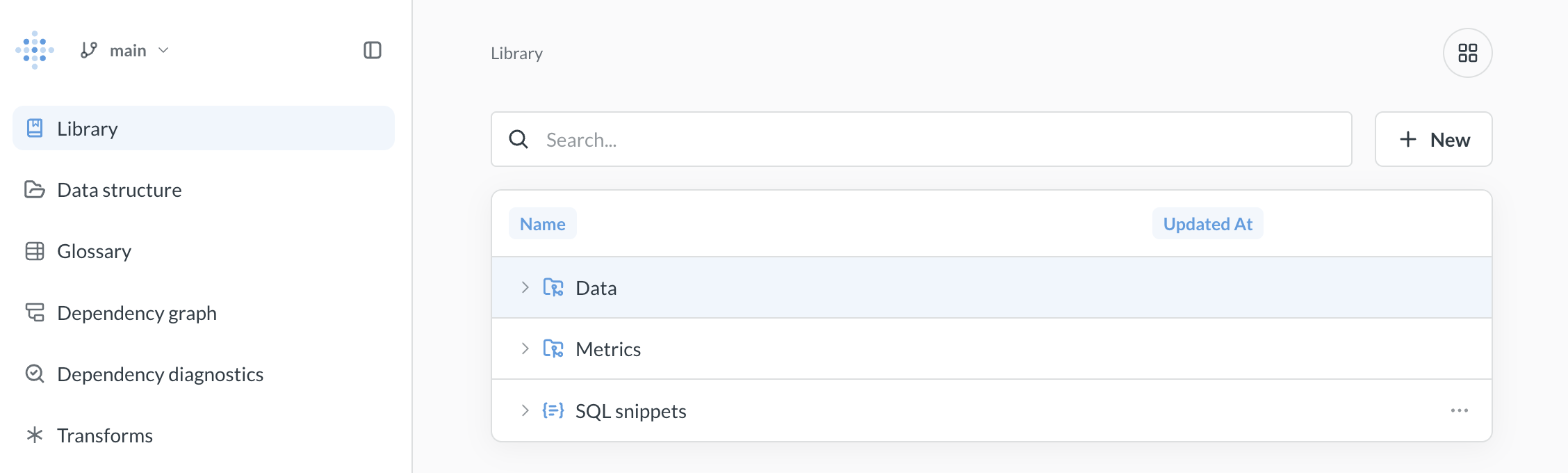
Data Studio provides tools to shape and track your data so everyone can trust the numbers.
- Create an easy-to-understand semantic layer to match how people think about your business.
- Speed up queries by transforming tables to anticipate usage patterns.
- View dependency graphs to identify and fix problems before they impact reports.
What’s in Data Studio
- Library*: A curated space for your organization’s most trusted analytics content—tables, metrics, and SQL snippets that your data team recommends.
- Managing tables: Add table metadata to make tables easier to work with.
- Segments: Create saved filters on tables so people can use consistent definitions when building queries.
- Measures: Create saved aggregations on tables so people can use consistent calculations when building queries.
- Glossary: Define terms relevant to your business, both for people and agents trying to understand your data.
- Dependency graph*: A visual map of how your content connects, so you can understand the impact of changes before you make them.
- Dependency diagnostics*: See which items have broken dependencies, or that aren’t used.
- Replace data sources*: Swap out a table or model across all content that uses it, in one operation.
- Transforms: Wrangle your data in Metabase, write the query results back to your database, and reuse them in Metabase as sources for new queries.
* Available on Pro and Enterprise plans.
Permissions for Data Studio
The keys to Data Studio are granted only to people in either the Admin or Data Analysts groups.
There are additional permissions required to run transforms, see Permissions for transforms.
Get to Data Studio
- Click the grid icon in the upper right.
- Select Data Studio.
Read docs for other versions of Metabase.