




From multi-format data in Presto, to insights in Metabase
If you’re using Presto, you’re probably working with large data sets in a variety of formats, and need a way to query connected tools like Elastic, Kafka, and Prometheus. Metabase lets your whole team visualize and explore your data in Presto with or without SQL. Run native queries and analyze structured and unstructured data in your data lake via Presto.
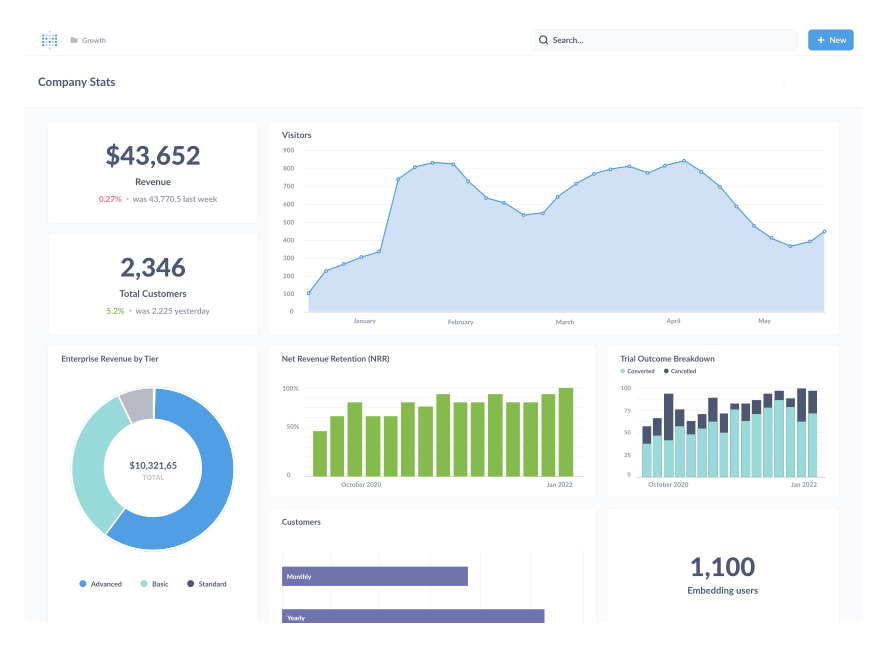
Easy-to-use data exploration tools for people of all levels
Get a BI tool with friendly UX that lets everyone make sense of your data in Presto.
- Query data in plain English with Metabot, your AI data assistant. Chat with your database, generate and debug SQL, get AI-generated summaries on charts, and more
- Interactive dashboards that load as fast as Presto does with click-to-explore functionality.
- Click to drill through on interactive charts and dashboards, zoom in on timelines or areas of interest, and break out for more context on a specific area.
- Ask questions with nothing more than clicks in the Query Builder—no SQL required (or use the SQL editor if that’s more your style).
- Set up models and metrics to give less technical teammates metadata-rich starting points, with trickier stuff like joins taken care of.
Give data access with granularity
Keep everyone in their own lane.
- Granular permissions for viewing and querying data, so people can see (and do) what they need to and nothing else.
- Map permissions to user groups and attributes with SSO.
- Detailed usage analytics lets you see who did what when.
Lots of options for sharing charts and dashboards with your team—or your customers
With as much interactivity and room to pull threads (or as little) as you want.
- Customer-facing analytics is just a snippet away. Embed all of Metabase in your app, or just a dashboard.
- Export charts and dashboards to PDF, CSV, or share via a public link.
- Set up subscriptions for regularly scheduled updates. Even to people without a Metabase login.
- Get alerts when things change unexpectedly.
Keep your data in Presto
Metabase runs queries directly in Presto, so your reports are always up-to-date.
In-warehouse Presto analytics without extracting data
Metabase runs direct queries in Presto without extracts, so your reports are always up-to-date with your Presto data and don’t require moving large data sets.
Metabase features with Presto
Available with all data sources
- Unlimited queries, charts, and dashboards
- Send dashboards and reports via email and Slack
- Connect to multiple data sources and integrations
- Single sign on via SAML, LDAP, or JWT
- Interactive embedding with white label customization
- Granular row- and column level permissions
Bonus features with Presto
See all features
Keep everything in your own cluster
Self-host Metabase and Presto to keep everything on your terms. Get your token and go. Both are open source, with optional cloud hosting.
Frequently asked questions

Presto pairs with a number of BI tools, each with their own pros and cons. Metabase is the most effective way to let everyone in the team start working with data. * Because of sophisticated but easy-to-use data tools like the query builder, which lets people ask questions without SQL, Metabase has a low learning curve. Simple drill-through, zoom-in, and breakout functionality lets people learn more from data with just a few clicks.
You can set up and connect Metabase to Presto in about 5 minutes and begin querying immediately, with drill-through functionality automatically generated and ready for people to start uncovering insights. Metabase is also open source and affordable, with plans and pricing that scales with you.
You can connect to Presto when you’re setting up a new Metabase instance, or add a database connection any time in your admins settings:
To add a database connection, click on the gear icon in the top right, and navigate to Admin settings > Databases > Add a database.
For the full details on connecting Metabase to Presto, check out our documentation.
Presto permissions can't be impersonated in Metabase (This is currently possible for PostgreSQL, Redshift, ClickHouse, and Snowflake databases).
With granular row-level permissions and user group mapping, you can effectively set up permissions to match those applied in Presto.
Metabase fits with Presto as a querying and visualization layer on top of your data. With Metabase you can query data in Presto - with or without SQL - to create a broad range of data visualizations and types and tell a story with interactive dashboards. Viewers can filter and drill-through to get what’s most relevant, and dig deeper on what’s important to them. Visualizations and dashboards can even be shared or embedded in your app.
Metabase makes it possible for everyone in the team to run their own reports, without data skills or relying on someone else to write SQL for them. People used to working in Excel can leverage skills usually reserved for spreadsheets to get the answers they need from data in Presto.
Metabase lets you bring together charts, visualizations, and questions into interactive dashboards that can be shared with your team and customers.
The automatically generated drill-through menu lets people click on charts to zero in on a particular category or parameter for further analysis; view individual records, or zoom in on a targeted date range. You can also add filters to let people slice the data on what’s most important to them, and add custom-click behaviors to guide data discovery (e.g. send people to a related dashboard).